
Finding text you copied yesterday takes too many steps.
NimKey for macOS · v1.0
Everything Vietnamese on Mac — keyboard, clipboard, translate.
NimKey combines a native Vietnamese keyboard, clipboard history, quick translate, and keyboard shortcuts in one lightweight macOS app.
Free forever for the keyboard + basic clipboard. Unlock Pro with a license key whenever you need more.
- Apple Silicon & Intel
- macOS 13+
- Native, no Electron
- ~18 MB
- Telex · VNI · VIQR
- Vietnamese
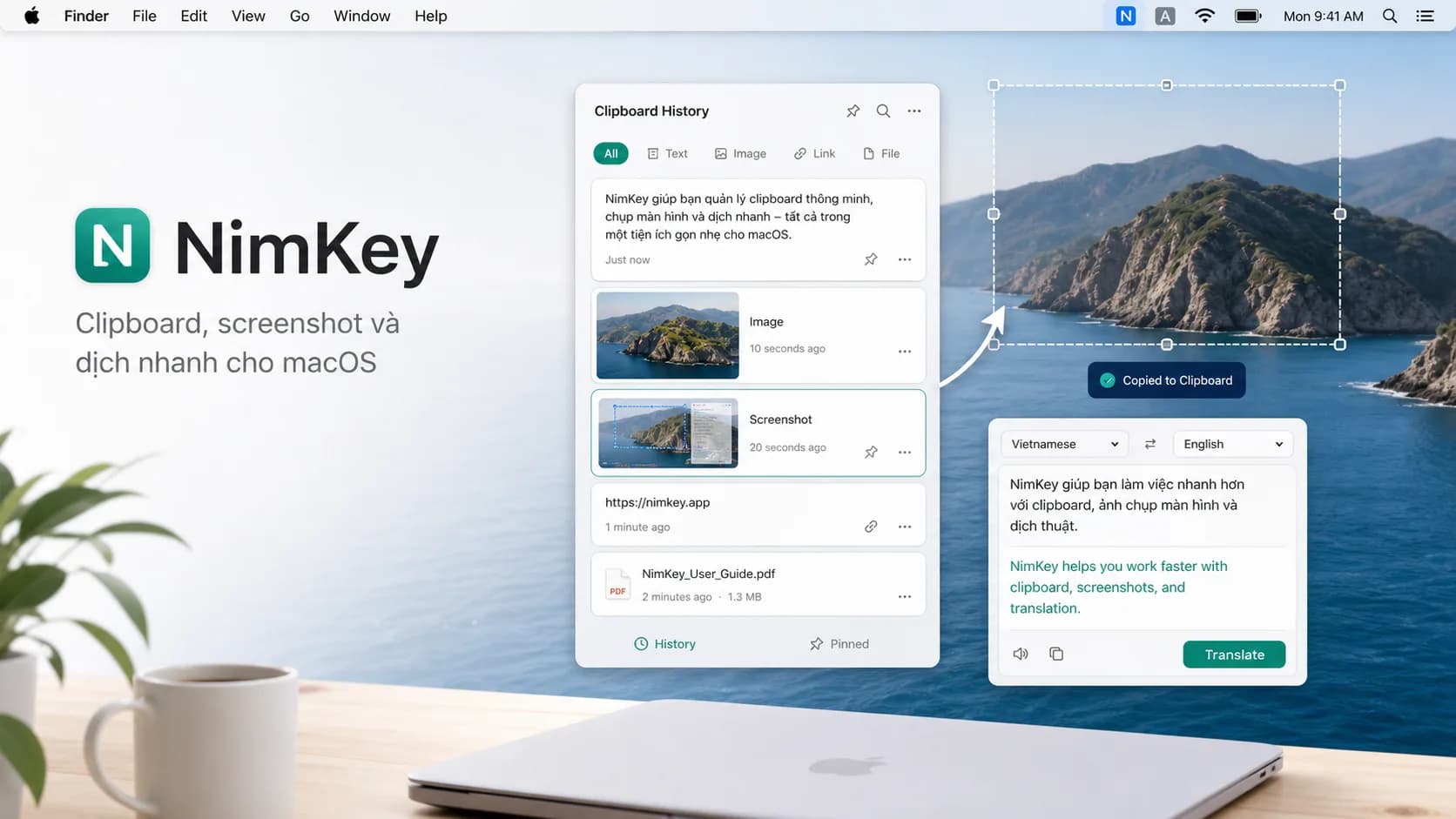
The problem
You're not slow because you lack effort. You're slow because the steps are scattered.
Typing Vietnamese in one place, finding what you copied in another, translating somewhere else, screenshots a separate flow again. NimKey rolls those repeated steps into a tighter Mac workflow.
Translating a short snippet usually pulls you out of your app.
Screenshots are hard to drop onto the clipboard at the right time.
The same phrases still get typed manually every time.
Workflow
A lightweight app for the things you do every day.
NimKey isn't just a Vietnamese keyboard. It helps you write, copy, translate, capture, and paste Vietnamese content faster on Mac.
Smooth Vietnamese typing on macOS
Native Vietnamese typing for everyday work, with the feel of a real Mac utility.
toi → tôi · viet → việt
Get back to anything you copied with one shortcut
Open clipboard history, find a recent snippet or image, then paste with the Command-V you already know.
⌥V opens clipboard popup
Translate the selected text without breaking flow
Select text in any app, hit a shortcut, see the translation in a small popup right at your cursor.
⌃⌥T EN ↔ VI
Capture and paste exactly when you need it
Send screenshots straight to the clipboard and history — easier to drop into chat, docs, or store for later than the default macOS flow. Each capture keeps its time and source.
⇧⌘4 → auto-saved to history
Expand the phrases you keep retyping
Expand templates, signatures, replies, or any phrase you use every day. Multi-line snippets and dynamic variables like date and current clipboard are supported.
@@email → support@nimkey.app
NimKey in action
See NimKey working in the apps you use every day.
Three workflows built for people who handle Vietnamese content on macOS.
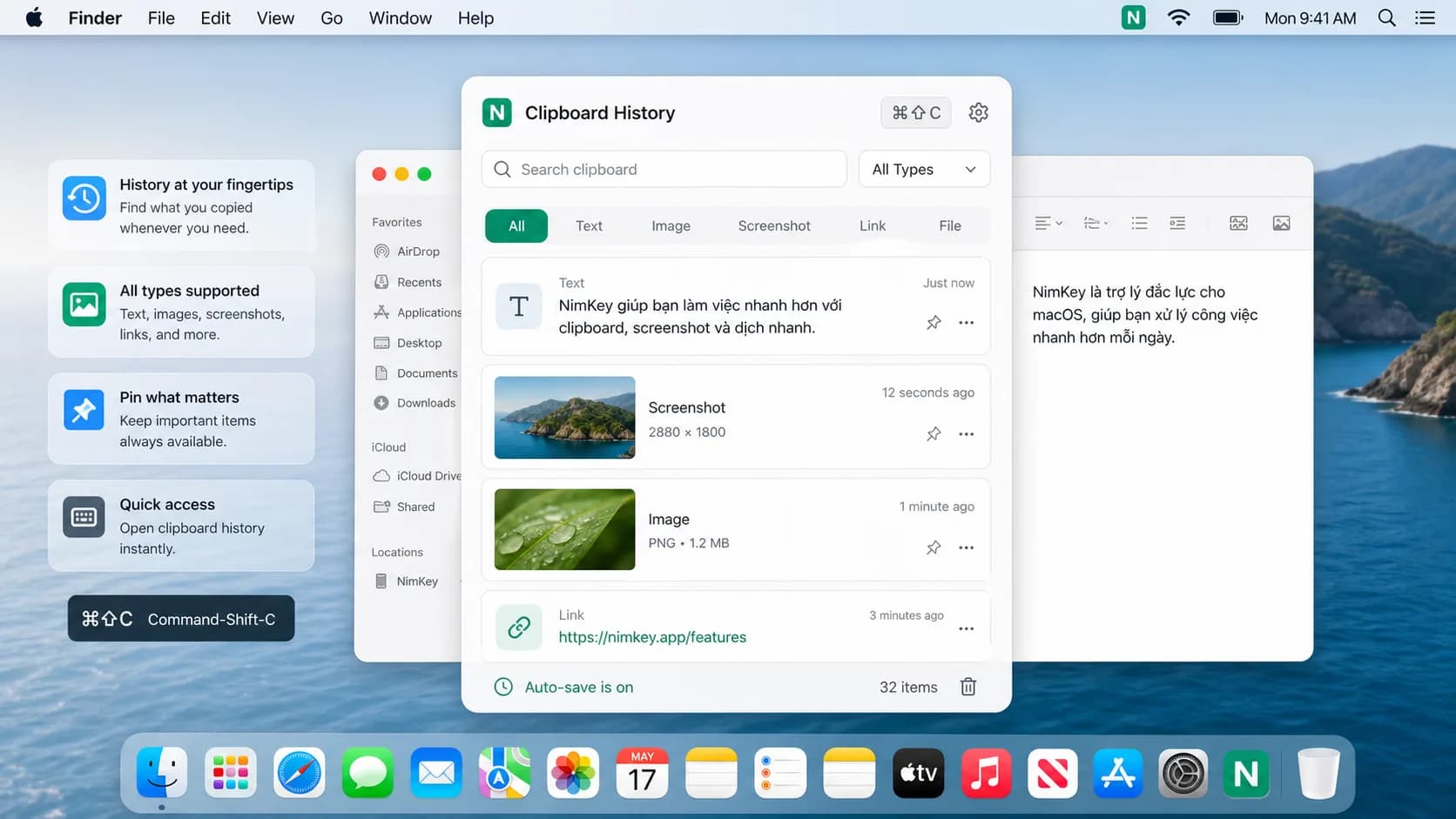
Clipboard history
Find everything you've copied.
Text, images, screenshots, links, files — all kept and searchable in one compact popup, opened with ⌘⇧C.
- Filter by Text · Image · Screenshot · Link · File
- Pin the items you reuse most so they're always ready
- Auto-saved locally, no silent cloud sync
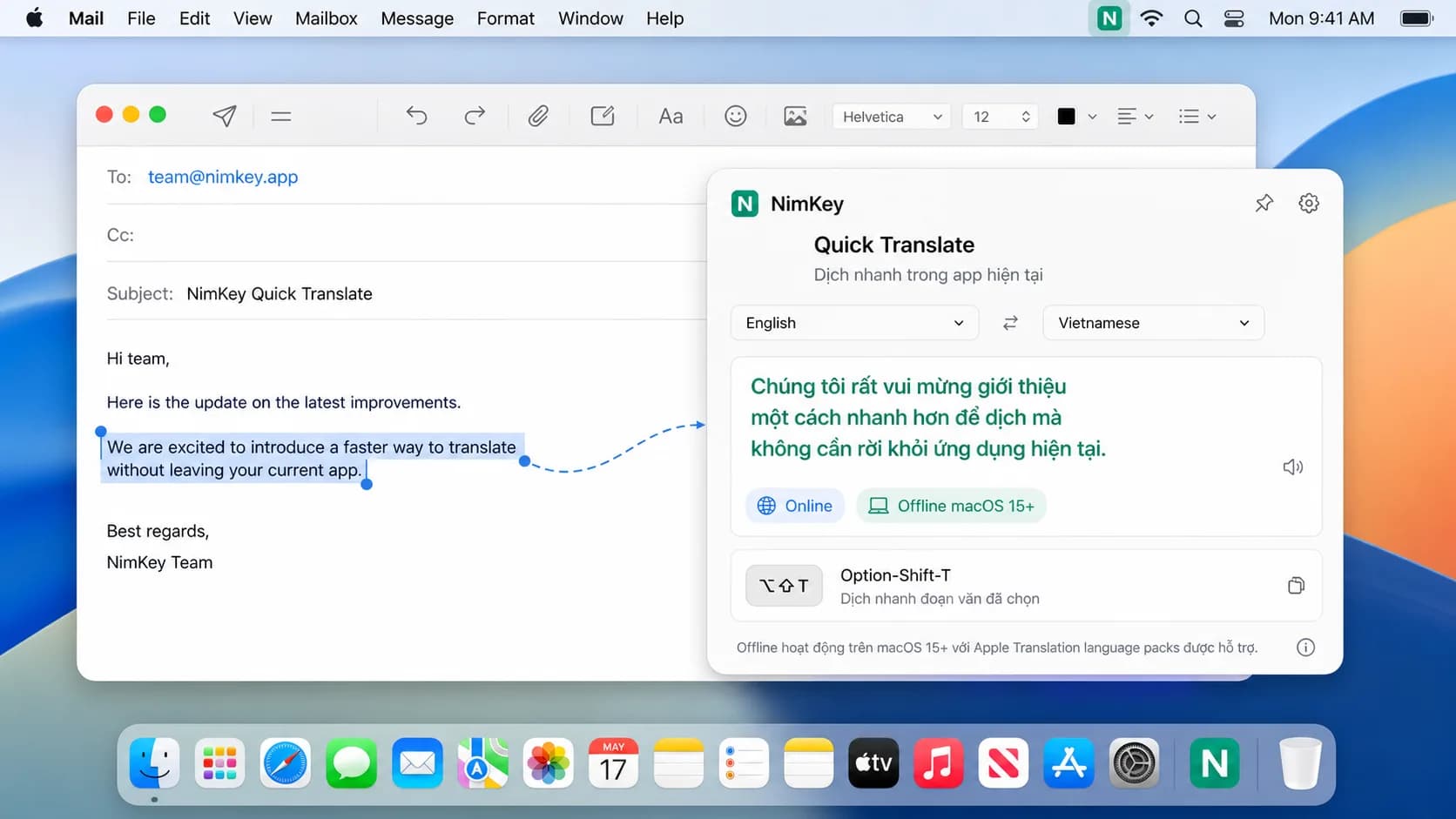
Quick Translate
Translate inside the app you're in, no window switching.
Select text — press ⌥⇧T — the translation appears right next to your cursor, into Vietnamese or any language you configure.
- Online or Offline (macOS 15+ Apple Translation)
- Quick language pair swap · pronunciation playback
- Clearly shows which translation provider is in use
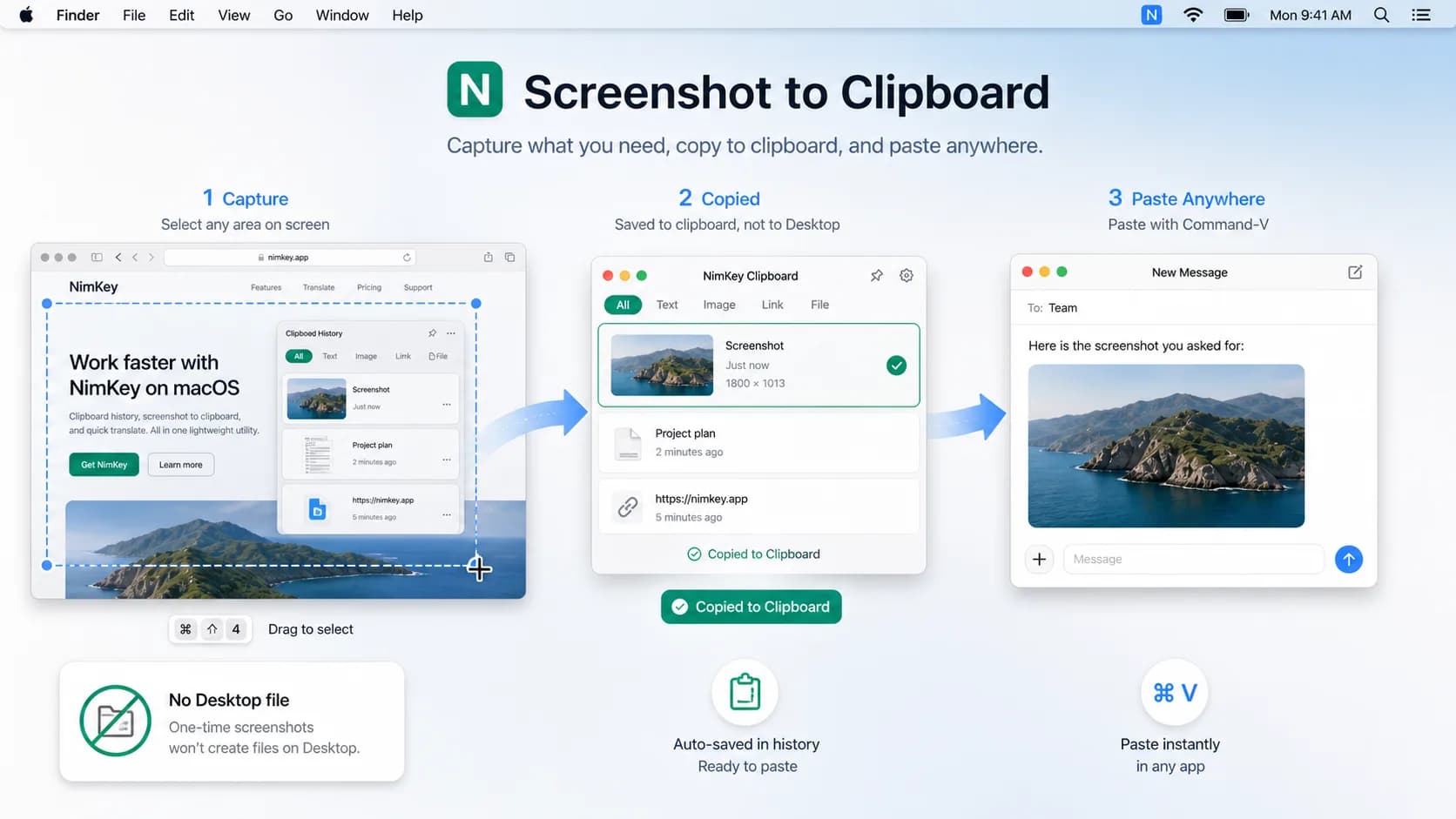
Screenshot to Clipboard
Capture — paste — done. No leftover files on your Desktop.
Press ⌘⇧4, drag any region, the image lands straight on the clipboard and in history. Paste with ⌘V anywhere you like.
- No clutter on your Desktop
- Auto-saved to history with size and source
- Ready to paste into Mail, Slack, Notes, Figma…
Free vs Pro
Start free. Upgrade when your workflow needs more.
Free
Enough for everyday work
Vietnamese keyboard and basic clipboard, no time limit.
- Native Vietnamese keyboard
- Basic clipboard history
- 20 clipboard items per day
- Download and use right away, no card needed
- Quick translate, screenshot workflow, macros
- Extended clipboard history
Pro
For people who work in Vietnamese every day
Unlock the full workflow. 14-day trial before you pay.
- Everything in Free
- Extended clipboard history, no 20-items-per-day cap
- Quick Translate right at the cursor
- Screenshot clipboard workflow
- Macros and power features
- Unlocked with a license key via email
Pricing
Free download. Upgrade to Pro when you need more power.
Prices in Vietnamese đồng. 14-day Pro trial, no card needed. Cancel anytime.
Free
Start with the Vietnamese keyboard and basic clipboard.
0₫
- Native Vietnamese keyboard for macOS
- Basic clipboard history
- 20 clipboard items per day
- No card needed
Monthly
Pro, billed flexibly month to month.
79,000₫/month
- Extended clipboard history
- Quick Translate
- Screenshot clipboard workflow
- Macros and power features
Yearly
Best value for people working in Vietnamese every day.
499,000₫/year
799,000₫Save 38%
- All Pro features
- Better value than monthly
- License key delivered by email
- Built for everyday use
Lifetime
Pay once for NimKey Pro, long-term.
1,499,000₫
2,499,000₫Launch offer
- All Pro features
- Pay once, keep forever
- On your personal Mac
- For people who want to own the license
14-day trial, no card required. License key delivered by email immediately after payment.
License key
Buy Pro on the web, enter your key in the app.
There's always a path from the website and from the Upgrade button inside the app. No accounts, no logins — just a license key sent to your email.
- 1
Download NimKey Free and start using it.
~18 MB download. Opening the app runs it in the menubar. - 2
Start a Pro trial or pick the Pro plan that fits.
14-day trial, no card needed. - 3
Pay on the website.
International cards, VietQR, Apple Pay. - 4
Receive your license key via email.
Usually within 1–2 minutes. - 5
Enter the key in NimKey to unlock Pro.
Settings → License → Paste & Activate.
Why trust NimKey
Light enough to run in the background, sharp enough to use daily.
Native macOS utility
Written in Swift, native on Apple Silicon and Intel. No Electron, no battery drain.
Free, no card required
Keyboard and basic clipboard free forever. You only pay when you really need Pro.
Clipboard stored locally
Clipboard history is designed to live on your machine. No default upload, no cloud backup.
Transparent translation
Quick Translate may use an online translation provider depending on the mode you pick. The mode and provider are always shown.
Clear licensing
Pro unlocks with a license key — no account, no login. You own the key like you own a copy of the app.
Regular updates
A public roadmap, shaped by people who type Vietnamese daily. Yearly and Lifetime receive updates per the policy stated at purchase.
FAQ
Questions before you download and buy Pro.
Don't see your answer? Email me at support@nimkey.app — usually a reply within 24 hours.
How long is the Pro trial?
The Pro trial is currently 14 days, no card needed. The trial length is read from the website's pricing config and may be adjusted at launch — whichever number you see on the pricing page is the one in effect.
What does Free include?
Free includes the native Vietnamese keyboard for macOS and basic clipboard history with a 20-items-per-day limit. You can use Free indefinitely, no expiration.
What happens after 20 clipboard items per day?
The Vietnamese keyboard stays free. Clipboard history pauses at the Free limit until the next daily cycle, or until you unlock Pro.
Where do I get the license key after buying?
After payment, the license key is sent to the email you bought with. Open NimKey → Settings → License → paste the key and tap Activate to unlock Pro instantly.
Is clipboard history stored in the cloud?
NimKey is designed to store clipboard history locally on your machine. If sync ever ships, it will be announced separately and you'll opt in.
Does Quick Translate need the internet?
Quick Translate may use an online translation provider depending on the mode you choose. We do not market the entire feature as offline — the mode and provider are always shown in Settings.
NimKey for macOS
Ready to work in Vietnamese on Mac, faster?
Download NimKey free, use the keyboard and basic clipboard right away. When you need more, the Pro trial and license key are ready.
macOS 13+ · Apple Silicon & Intel · ~18 MB